Status
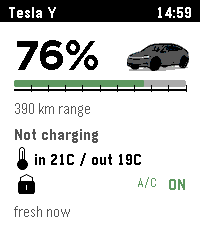
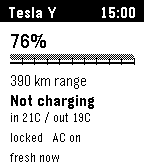
Battery, range, charging, charge limit, cabin and outside temperature, locks, climate, and data age.
 Pebsla
Pebble watch app for Tesla owners
Check your car, warm or cool the cabin, open the trunk or frunk, flash the lights, and find your Tesla from Pebble's physical buttons.
Why it feels useful
Pebsla puts the Tesla actions you reach for most on your wrist. It is made for parking lots, cold mornings, quick checks and moments when the phone is buried in a bag.
What the app does
Battery, range, charging, charge limit, cabin and outside temperature, locks, climate, and data age.
Turn climate on or off and set the cabin temperature. The watch supports Celsius and Fahrenheit.
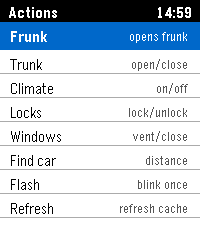
Frunk, trunk, windows, unlock, and lock. Risky actions have a confirmation screen on the watch.
Flash, honk, and heading to the car when vehicle location and phone GPS are available.
Real screens
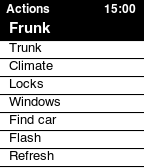
Pebsla keeps the watch UI plain and fast: one status screen for the car and one familiar Pebble list for actions.
Designed for owner control
You sign in on Tesla pages. Pebsla never asks for a Tesla password.
Pebsla connects only to the vehicle you approve for this watch.
Tesla asks you to approve the virtual key before Pebsla can control the car.
After Tesla login, the callback saves the watch connection to Pebble settings.
Onboarding
Setup takes a few minutes because Tesla needs to confirm account access and vehicle control. After that, daily use happens from Pebble.
Before you start
A Pebble watch, a paired phone with internet, and a working Pebble/Rebble setup.
An account with access to the car. The Tesla app may be needed to approve Virtual Key.
Run the first command tests next to the car. Frunk, trunk, windows, and unlock have real effects.
Trial includes 100 credits valid for 7 days. Commands use 10 credits and manual refresh uses 5 credits. Purchased credits are valid for 1 year.
Included
Planned later
Pricing
Pebsla uses prepaid credits: commands use 10 credits, manual refresh uses 5 credits. Trial credits are valid for 7 days; purchased credits are valid for 1 year from the date they are added to your Pebsla account.
Starter
14.99 EUR
Up to 250 commands or 500 manual refreshes after the included trial credits.
Start with StarterPlus
29.99 EUR
Regular-use pack with more headroom for daily climate, lock and Find Car actions.
Choose PlusPower
49.99 EUR
Frequent-use pack for more daily actions and less thinking about balance.
Choose PowerCommands use 10 credits. Manual refresh uses 5 credits. If a refresh needs to wake the car, Pebsla asks before using another 5 credits.
Credits make cost predictable while still letting Pebsla avoid unnecessary wakeups where possible. Purchased credits are valid for 1 year.
Security
Login happens on Tesla pages. Pebsla stores encrypted authorization tokens and gives the watch its own private connection token.
To stop access, remove Pebsla in your Tesla account and remove the Pebsla virtual key from the car. You can also contact support to delete local Pebsla data.
FAQ
Usually no. Pebsla shows the last known status first. Manual refresh may wake the car, and that is limited to avoid surprises.
Not in this version. The watch uses the paired phone's internet connection.
Manual refreshes and commands need credits. Trial starts with 100 included credits on the connected vehicle, valid for 7 days. Purchased credits are valid for 1 year from the date they are added.
No. Pebsla is an independent app. It uses Tesla authorization and virtual key flows.
Start with 100 included credits, approve Tesla access, pair the virtual key and save settings to Pebble.